
ToonMe photo cartoon maker
PHOTO LAB DMCCPhotography
4.510.76K Reviews
- Version
- 0.7.24
- Installs
- 100.00M
- Age Rating
- Everyone
Screenshots
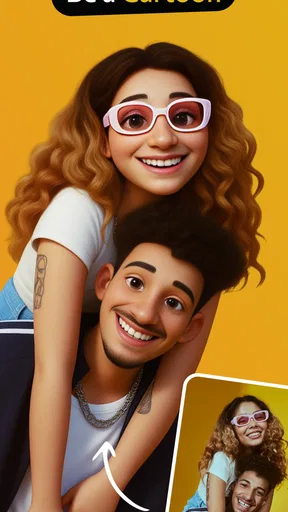
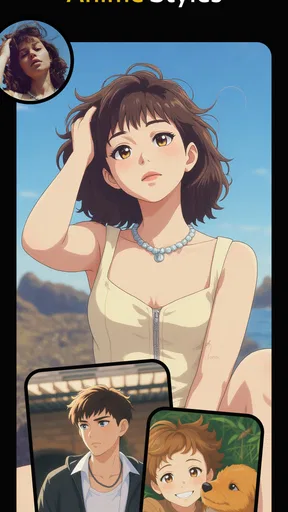
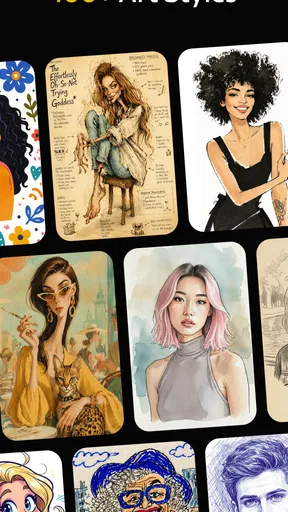
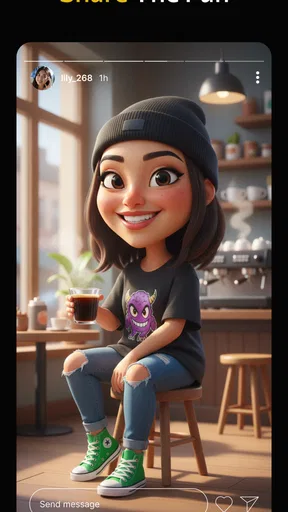
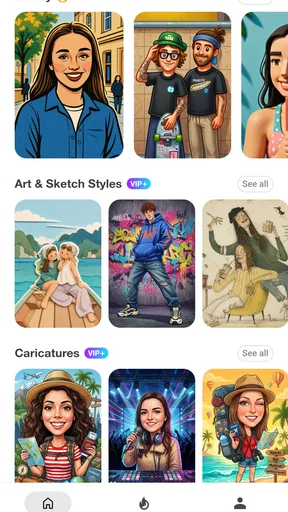
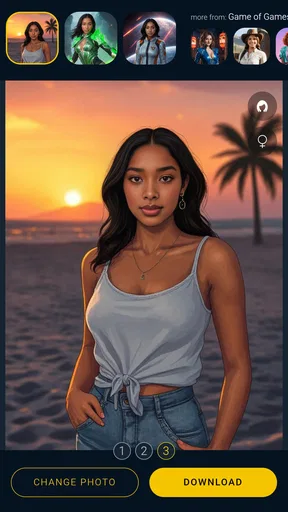
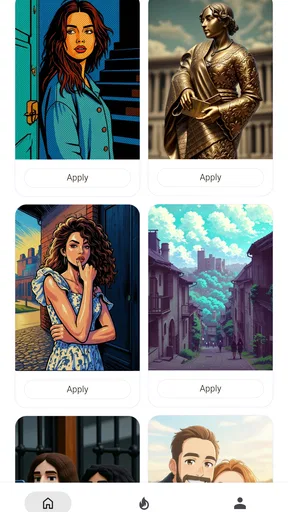
Our Review of ToonMe photo cartoon maker
 Analysis by Appyee
Hey there! So, I recently got my hands on this cool app called ToonMe, and I’ve been having a blast turning my selfies into awesome cartoon versions. If you're into having a bit of fun with your photos, you might want to check this out. Let me walk you through my experience with it.
For a quick profile-picture refresh or a playful edit to share with friends, ToonMe is easy to understand: choose a portrait, try an illustrated treatment, and decide whether the result feels like you. I find it most useful when I want one striking image rather than a full editing session. It is a free photography app from PHOTO LAB DMCC, with optional in-app purchases ranging from $0.99 to $99.99 per item, so trying the basic experience does not require an upfront purchase.
The app is aimed at anyone who enjoys stylized portraits, but the best results depend on the photo you start with. A clear, front-facing image with your face unobstructed gives the effect more to work with. If I’m choosing between several pictures, I look for even light and a relaxed expression before opening the editor; that small bit of selection can matter more than repeatedly changing the style afterward.
What’s the Deal with ToonMe?
Alright, so what exactly is ToonMe? It’s this nifty app that lets you transform your regular photos into quirky, cartoon-style images. Think of it like giving your pics a fun, animated twist. Whether you’re into classic cartoon styles or the more modern Pixar-like feel, this app has got you covered.
ToonMe sits in a different corner of photo editing from a conventional retouching app. A general editor is usually better when I want precise control over exposure, color, cropping, or small blemishes. Here, the appeal is the bold change in the portrait itself: the image becomes an illustration, not simply a more polished photograph. That makes it a better fit for a playful avatar than for correcting a picture I need to look natural.
When you first open the app, you’re greeted with a pretty user-friendly interface. Everything is laid out in a way that’s easy to navigate, even if you’re not the most tech-savvy person out there. I found myself exploring all the features without any hassle, which is always a plus.
There is also a practical choice to make before editing: decide what the finished image is for. A close-cropped portrait can work well as a profile picture, while a version intended for a story or message may benefit from more space around the face. I like to keep the original photo unchanged and treat the cartoon result as a separate creative copy, so I can come back to the unedited image if I later want a more realistic look.
Getting Started with the App
Jumping into the app, the first thing you’ll want to do is upload a photo. You can either snap a new one or choose from your gallery. I opted for an old selfie I had lying around. Once you upload it, the magic starts to happen.
A realistic everyday use is turning a recent selfie into a lighthearted profile image before a group chat or social account refresh. I would first pick a photo where the face is large enough to read clearly, then compare a few treatments instead of settling on the first result. If the source image is dim, partly covered, or taken at an unusual angle, I would switch to another photo rather than assume the effect can repair every problem in the original.
The app uses AI to work its wonders, and honestly, I was surprised at how fast it processed my image. Within seconds, my photo had transformed into a cartoon version of myself. The detail was pretty impressive, capturing my features in a way that was both flattering and fun.
The speed makes experimentation feel casual, but I would still judge each result at full size before sharing it. A portrait can look convincing at a glance and reveal odd details around hair, glasses, or the edge of the face when viewed more closely. That is one reason I treat the output as an expressive illustration rather than a faithful replacement for a photograph. If accuracy matters more than personality, a regular portrait editor is the safer choice.
Diving into the Features
One of the things I really liked about ToonMe is the variety of styles you can choose from. You’re not just stuck with one cartoon look. The app offers several styles, from the classic hand-drawn look to the more polished, digital art style. I spent a good amount of time playing with these options.
One useful way to compare styles is to keep the same source portrait while testing them. That makes it easier to tell whether a look suits the person in the picture, rather than confusing a better source photo with a better effect. I also think the most dramatic treatment is not automatically the best: for a small avatar, a simpler result may remain recognizable when displayed at reduced size, while a more elaborate image can be more fun when sent as a full-size picture.
Another cool feature is the ability to tweak the images. You can adjust the intensity of the cartoon effect, add backgrounds, and even apply filters. It's like having a mini art studio on your phone. I found myself getting a bit carried away, but hey, it’s all part of the fun, right?
My own rule is to make one adjustment at a time. If I change the effect strength, background, and filter together, it becomes hard to know which choice improved the portrait. A restrained edit can keep the face as the focus; a busy background may compete with the illustration, especially when the picture is used as a tiny profile image. This is a small workflow tip, but it helps me avoid spending time on decorations that do not survive the final crop.
For someone who enjoys experimenting with their appearance online, the app’s strongest use is variety without needing to learn a complicated drawing tool. It is less suitable for a creator who needs consistent character art across many images, precise control of facial details, or a dependable likeness for professional use. ToonMe is designed around quick stylization, so I would not choose it as a substitute for an illustration program when repeatable, detailed artwork is the goal.
Sharing and Saving Your Creations
Once you've got your cartoon masterpiece, sharing it is a breeze. The app integrates smoothly with social media platforms, so you can show off your new look to friends and followers in no time. Plus, you can save your creations directly to your device if you prefer keeping them private.
Saving first is a sensible habit if I want to reuse an image in several places. I can inspect the saved version, crop it for a particular profile, or keep it for myself without posting immediately. It also gives me a chance to decide whether the cartoon treatment feels right outside the app, where it will appear beside ordinary photos rather than among other effects.
One thing to note, though, is that some features require a subscription. If you’re planning on using the app frequently, it might be worth considering. However, there are plenty of free options to keep you entertained if you’re just looking to dabble a bit.
Because optional purchases are available, I would explore the free choices first and only consider paying if I have a clear reason to return to a particular paid feature. The listed purchase range runs from $0.99 to $99.99 per item, so it is worth checking the price shown for the specific option before confirming anything. For occasional edits, the free experience may be enough; frequent users should decide whether the features they actually want justify the cost rather than paying simply because they have tried the app once.
ToonMe is rated for Everyone, and it has built a large audience: it has more than 100 million installs, an average rating of 4.5 from around 1.9 million ratings, and about 11,000 written reviews. Those figures suggest broad interest, but they cannot tell me whether a particular portrait treatment will suit my taste. I would use them as context, then make the decision based on the look and workflow I want.
How It Fits into a Photo Workflow
The app’s role is clearest when I think of it as one stop in a small editing workflow, not the only camera or photo tool on my phone. I can pick a strong original in my gallery, make a cartoon version, save it, and then use a separate editor if I need a particular crop or final adjustment. That division keeps the stylized effect as the creative centerpiece while leaving ordinary editing tasks to tools built for them.
For a quick social post, that may be all I need. For a family picture, an image intended for printing, or a portrait where everyone must look recognizably themselves, I would compare the result carefully with the original and might choose a subtler edit elsewhere. The trade-off is straightforward: ToonMe makes a portrait feel more distinctive, but the more the treatment changes a face, the less suitable it may be for situations where natural likeness matters.
Another practical question is whether it is worth keeping installed if I only want one cartoon portrait. I think it can be, if trying different looks is part of the fun; for a one-off task, I would first see whether the available free options give me a result I like. On the other hand, if I regularly want illustrated profile pictures or playful edits for messages, having a dedicated portrait-effects app is more convenient than rebuilding the same look manually in a general editor.
What Has Changed and What to Watch
The app was released on November 5, 2020, and its current version is 0.7.19. Those facts place it as an established app with a versioned history, but they do not tell me which individual tools have changed or how a future release will behave. I would separate that known product context from expectations: the useful test for an existing user is whether the current styles and editing choices still suit the images they want to make.
If you already use it, the basic appeal remains easy to assess: choose a portrait, explore illustrated treatments, adjust the result, and save or share it. If you are deciding whether to install it now, I would focus on whether you want a quick cartoon transformation rather than assuming that a new version means a particular feature or improvement. I would also keep an eye on the actual options and prices presented in the app, especially before relying on a paid effect for a project.
The minimum operating system requirement is Android 6.0. That makes device compatibility worth checking before downloading, particularly if you use an older Android phone. Once installed, the most useful way to judge the app is with a photo you are comfortable experimenting with and a clear idea of how you plan to use the result.
Final Thoughts
All in all, I’d say ToonMe is a fun and entertaining app for anyone looking to add a bit of flair to their photos. It's easy to use, offers a range of creative options, and the final results are sure to bring a smile to your face. Whether you're killing time or looking to spice up your social media game, this app is definitely worth a try.
So, if you’ve got some photos lying around that could use a cartoon makeover, give ToonMe a shot. You might just find yourself hooked on bringing out your inner cartoon character!
Verdict
Strengths of ToonMe photo cartoon maker
- User-friendly interface for quick edits
- Variety of cartoon styles available
- High-quality output images
- Frequent updates with new features
- No watermark on downloaded images
Limitations of ToonMe photo cartoon maker
- Some features require a paid subscription
- Occasional app crashes reported
- Limited free version options
- In-app ads can be intrusive
- Requires internet for some features
Other Releases by PHOTO LAB DMCC
View All
Photo Lab Picture Editor & Art
Photography4.5
Similar Picks in This Category
View All
Google Photos
Google LLC4.4

Gallery
Google LLC4.2

Picsart AI Photo Editor, Video
PicsArt, Inc.3.9

B612 AI Photo&Video Editor
SNOW Corporation4.1

BeautyPlus-Selfie Photo Editor
PIXOCIAL TECHNOLOGY (SINGAPORE) PTE. LTD.4.5

Remini - AI Photo Enhancer
Bending Spoons4.1
Frequently Asked Questions
What is ToonMe and how does it work?
ToonMe is a photo editing app that transforms your images into cartoon-style portraits. Using AI technology, it analyzes your photo and applies artistic filters to create a unique, animated version. Simply upload a photo from your gallery or take a new one, and choose from various cartoon styles to achieve the desired effect.
Is ToonMe free to use, or does it require a subscription?
ToonMe offers a free version with basic features, but it also includes in-app purchases for premium options. The premium subscription unlocks additional cartoon styles, removes ads, and provides higher resolution outputs. Users can opt for a monthly or annual subscription, depending on their needs.
What platforms is ToonMe available on?
ToonMe is available for both Android and iOS devices. You can download it from the Google Play Store for Android or the Apple App Store for iOS. Ensure that your device meets the minimum operating system requirements to install and run the app smoothly.
How does ToonMe handle user privacy and data security?
ToonMe prioritizes user privacy by adhering to strict data protection policies. The app only accesses your photos with permission and does not store personal data beyond what is necessary for processing. It's recommended to review ToonMe's privacy policy for detailed information on how your data is managed.
Can I share my ToonMe creations on social media?
Yes, ToonMe makes it easy to share your cartoon creations on social media platforms. After editing your photo, you can directly share it to apps like Instagram, Facebook, or Twitter through the integrated sharing options. This feature enhances the app's appeal for users looking to showcase their creative edits.
